A client can elect to allocate their investment across
multiple Models.
To invest in multiple Models
From the Display Selector, choose the client
account that will be investing in multiple Models.
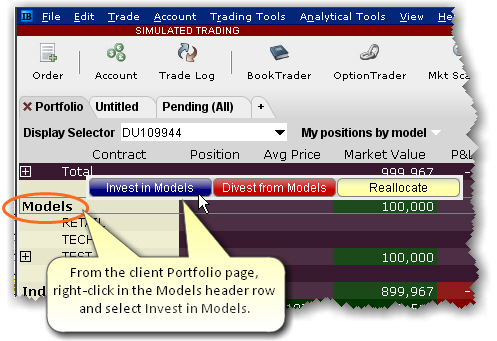
Right-click the
Models header row and select
Invest in Models.
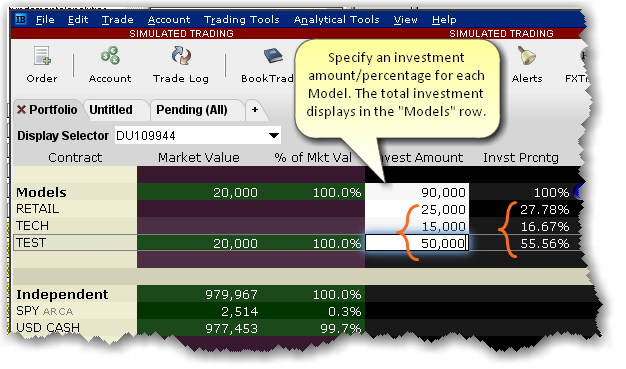
Specify the amount
you want to invest in each available model. You can enter values by:
Entering
an investment amount or percentage in the entry field for each
model. The system will total the investment in the header row.
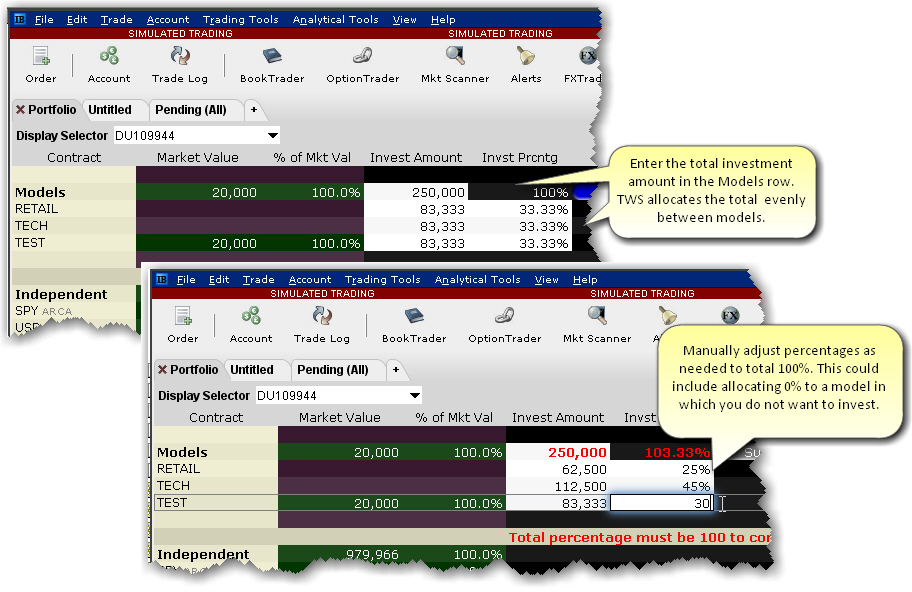
Entering
a total investment amount in the header row entry field and allowing
the system to evenly allocate the total amongst all models. This
method allows you to manually adjust percentages. Enter 0% for
any model in which the client does not want to invest.
The investment is distributed amongst the selected Models
based on the existing structure of each.
If the Model is not yet funded, the investment
serves as the initial cash investment.
If the Model is funded with cash only, the investment
is added to the current funding and will be used to purchase investment
instruments.
If the Model has positions, the investment is used
to purchase units in the same
ratios currently held in the Model.